Fix this, anywhere. Select text in any app and press three keys. Prompty rewrites it right where it is.
CtrlAltF
Free to start. No credit card needed.
The bar at the top of your screen takes a short request, asks one question, writes the full prompt into your AI app, asks for a better version and frames the best answer.
 Prompty is ready
Writing your prompt
You do the first step. Prompty does the part most people skip: it asks what's missing, writes the prompt, sends it, then reads the answer and goes round again until it's good.
Type it, or speak it on Plus and Pro. Messy is fine.
One or two short questions, only when something important is missing.
In the style that AI likes, in a fresh chat in the app you already use.
It reads the answer, asks again when something's missing, and frames the best one.
Each AI likes to be asked differently. Claude works well with clearly tagged sections, ChatGPT with headings and numbered steps. Prompty knows the difference.
What you type
write a linkedin post about my new product
8 words. Prompty asks two questions: who it's for, and how long.
What Prompty sends
<role>You write LinkedIn posts for small founders.</role>
<task>Announce Prompty, a desktop agent that writes better prompts for Claude and ChatGPT.</task>
<audience>Founders who use AI every day but get average answers.</audience>
<format>Under 150 words. A strong first line. Three short paragraphs. End with one question. No hashtags.</format>
## Role
You write LinkedIn posts for small founders.
## Task
Announce Prompty, a desktop agent that writes better prompts for Claude and ChatGPT.
## Audience
Founders who use AI every day but get average answers.
## Format
1. Under 150 words, with a strong first line.
2. Three short paragraphs, ending with one question.
3. No hashtags.
Example for illustration. What you get back depends on the AI and on your request.
ClaudeClear sections, each one tagged. ChatGPTHeadings and numbered steps.
 GrokPlain and direct, goal first.
 PerplexityOne precise research question.
ChatGPT answers the words you give it. Prompty makes those words worth answering, then checks the reply for you.
It runs inside the ChatGPT, Claude, Grok or Perplexity you already have, and each AI gets its own agent that knows how it likes to be asked. Free accounts work too.
Fix this, anywhere. Select text in any app and press three keys. Prompty rewrites it right where it is.
Compare two AIs. On Pro, one prompt goes to two AIs at once, and the better answer gets the frame.
Custom agents for jobs you repeat. Prompty remembers how you like each job done, and opens the app when the answer is ready.
Talk instead of typing. Voice in up to 18 languages on Plus and Pro, and Prompty can read its questions back to you.
A fresh chat every time. Prompty opens a new chat for each request, so old messages never leak into a new one.
Updates that ask first. Every update is signed by Lumly and checked before it installs. You choose when.
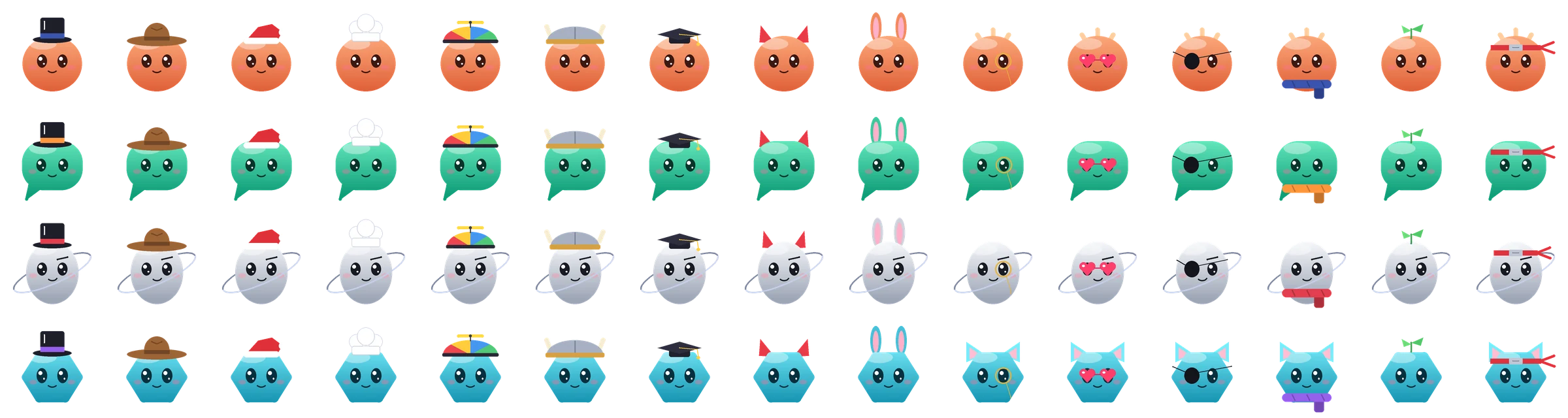
Dress up your agents. 29 hats and accessories. One in a hundred agents is born shiny, golden and sparkly.
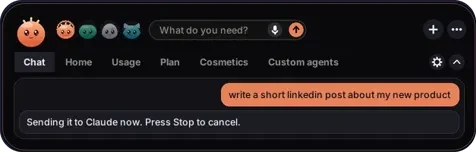
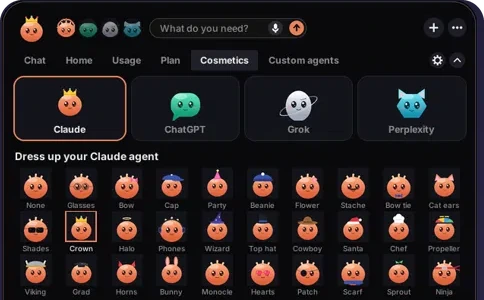
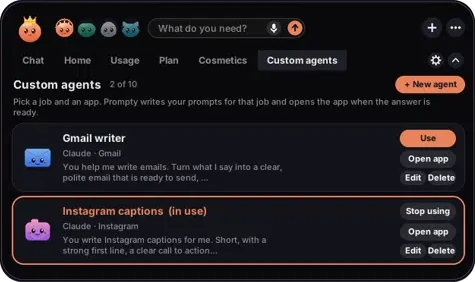
Chat, history, your plan, the Cosmetics tab and your custom agents all open inside the bar. There's no window to manage.
Prompty uses your mouse and keyboard and reads your screen, so it's fair to ask exactly what it looks at.
%APPDATA%\Prompty.Windows shows "Windows protected your PC" for new apps that aren't code-signed yet, which costs money and takes time for a small company. Click More info, check that it says Prompty-Setup-0.54.exe, then click Run anyway. Code signing is on our list.
This is the SHA-256 fingerprint of Prompty-Setup-0.54.exe. If yours matches, it's the exact file we published.
a42ed4c4db07d3a555f0c7f82431dbf1e92bd41272fdfc0e0b66e4894e3b65e8In Command Prompt: certutil -hashfile Prompty-Setup-0.54.exe SHA256, or look it up on VirusTotal.
Daily usage to get started. Improves the answer once. All four agents.
5× the usage of Free. Improves the answer up to twice. Voice and 8 languages.
15× the usage of Free. Up to 5 rounds of improving. Compare mode and 18 languages.
“Most people don’t know how to write a good prompt, and it’s the difference between an average answer and a great one. So I built the thing that writes it for you.”
The first version of Prompty was a Python script in a black Command Prompt window. Lumly is just me for now, so if something breaks or you have an idea, you're writing straight to the person who builds it.
 Jonathan, founder of Lumly, Tel Aviv
Free to start. No credit card needed.
Prompty-Setup-0.54.exe from your Downloads folder.Open Settings, then Apps, Installed apps, Prompty, Uninstall. Your settings folder %APPDATA%\Prompty can be deleted after that.
Prompty-Setup-0.54.exea42ed4c4db07d3a555f0c7f82431dbf1e92bd41272fdfc0e0b66e4894e3b65e8The Mac version is in the works. Leave your email and you'll hear when it's ready.
Every plan includes all four agents and works with your free ChatGPT, Claude, Grok or Perplexity account. Paid plans give you more daily usage, more rounds of improving, voice and more languages.
Pay yearly and get 2 months free.
Try Prompty on your everyday questions.
No card, no trial clock.
For people who use AI every day.
Billed monthly. Cancel any time.
For heavy users and people who work with AI.
Billed monthly. Cancel any time.
Prices in US dollars. Paid through PayPal, with your PayPal balance or a card. Refunds within 7 days of your first payment.
Install it and make your free account in the app.
In the bar, open Plan and click Upgrade on Plus or Pro.
Your plan switches on within about a minute.
Upgrades start from the app so the payment always goes to the right account.
Every build of Prompty, newest first. Get the latest one on the download page.
Use the contact form, or email the address below. For a bug, include your Prompty version (Settings), which agent you used, what you asked for and what happened. A screenshot helps a lot.
lumlysupport@gmail.comQuestions, bugs, billing or an idea for Prompty. Send it here, or email us directly.
Last updated 31 October 2026
This explains what Prompty and lumlyai.com collect, why, who else handles it, and what you can ask us to do with it. We've tried to write it in plain words.
Prompty is made by Lumly, based in Tel Aviv, Israel. Lumly is run by Jonathan E. and is responsible for your data under this policy. Contact: lumlysupport@gmail.com.
If you're in the EU or UK, our legal reasons are: to provide the service you asked for (contract), to keep it safe and working (legitimate interests), to meet legal duties such as tax records, and your consent for the launch and waitlist emails (you can withdraw it any time).
Prompty's AI is provided by Anthropic. Your requests and screenshots go from the app, through our server, to Anthropic, and the answer comes back the same way. We don't keep a copy on our server. Anthropic says it automatically deletes this data within 30 days (longer only if something breaks its usage rules or the law requires it), and under its commercial terms it doesn't use it to train its models.
In %APPDATA%\Prompty: your settings, your Prompty history (your past requests, in plain text), usage totals, and your sign-in, which is encrypted with Windows so other programs can't read it. You can clear your history in the app, or delete the folder after uninstalling.
We use these services to run Prompty. Each only gets what it needs:
The news headlines and market prices shown in the app are fetched from public sites (such as TechCrunch, MIT Technology Review and Yahoo Finance). Like any website, they see your internet address when the app loads them; they don't get anything else from Prompty.
We share data with others only if the law requires it, to protect people from harm, or as part of a sale of the business (in which case this policy keeps applying). We never sell it.
Our providers store data on servers outside Israel, mainly in the United States and Europe. They're required to protect it with security measures and contracts appropriate to the law.
Everything travels encrypted (HTTPS). Each account can only read its own data, all changes go through our server, our secret keys never leave the server, and you can turn on 2-step verification. No system is perfect; if something goes wrong that affects your data, we'll tell you and the authorities as the law requires.
You can ask to see the data we have about you, correct it, delete it, get a copy, or object to how we use it. Email lumlysupport@gmail.com from your account's address and we'll answer within 30 days. You can also complain to Israel's Privacy Protection Authority, or to the data protection authority where you live.
Prompty is for people 18 and over. We don't knowingly collect data from anyone younger; if you think we have, tell us and we'll delete it.
This website doesn't use cookies, analytics or ads. The preview code is remembered only in your browser for the current visit. The upgrade page loads PayPal's checkout, which may use its own cookies under PayPal's privacy policy.
If we change this policy in a way that matters, we'll update the date above and tell account holders by email or in the app before it applies.
Last updated 9 October 2026
These terms are the agreement between you and Lumly (run by Jonathan E., Tel Aviv, Israel) for using the Prompty app and lumlyai.com. By creating an account or using Prompty, you agree to them. Our privacy policy and refund policy are part of them.
Prompty helps you write prompts and, when you ask, operates the Claude, ChatGPT, Grok or Perplexity desktop app on your computer: it opens a chat, types and sends your prompt, takes screenshots of that app's window to read the answer, and may send follow-up messages. While it's working it controls your mouse and keyboard, so let it finish before using your computer, and keep private things out of that window.
AI answers can be wrong, incomplete or out of date. Check anything important before you rely on it, especially medical, legal, financial or safety matters.
You need your own accounts with the AI apps you use, and you must follow their terms. Messages Prompty sends in those apps count as yours. Prompty is an independent product. It isn't made, endorsed or sponsored by Anthropic, OpenAI, xAI or Perplexity. Claude, ChatGPT, Grok and Perplexity are trademarks of their owners.
The Free plan costs nothing. Plus and Pro give you more usage (shown as a multiple of Free) and more features, as described on the pricing page. Usage limits reset daily at midnight UTC. We may change the Free plan at any time. We won't reduce what a paid plan includes during a period you've already paid for.
See the refund policy.
What you type, say and get back stays yours. You let us process it only to run Prompty for you, as the privacy policy explains. You're responsible for what you ask for and how you use the answers, and for having the right to anything you put into Prompty.
Prompty, its design, characters and name belong to Lumly. You get a personal, non-transferable right to install and use it on your own computers while these terms apply. We release updates to fix problems and improve Prompty; the app asks before installing them. Features may change or be removed over time.
You can stop using Prompty and ask us to delete your account at any time. We may suspend or close an account that breaks these terms or puts others at risk; if that happens without a serious reason, we'll refund the unused part of a paid period. If we ever shut Prompty down, we'll give at least 30 days' notice and refund unused paid time.
We work hard to keep Prompty running well, but it's provided "as is". We can't promise it will always be available, error-free, or work with every version of the AI apps, which can change without notice.
As far as the law allows, Lumly isn't liable for indirect or follow-on losses (such as lost profits or data), or for what the AI apps or AI answers do. Our total responsibility for any claim is limited to what you paid us in the 12 months before it, or $50 if that's more. Nothing here limits anything the law doesn't allow to be limited, such as liability for fraud or your rights as a consumer.
These terms are governed by the laws of Israel, and the courts of Tel Aviv-Yafo have jurisdiction. If you're a consumer living elsewhere, you keep the protections of your own country's law and can use your local courts. Please contact us first; most things can be sorted out by email.
If we make important changes, we'll tell account holders by email or in the app at least 30 days before they apply. If you don't agree, you can cancel before then.
Last updated 9 October 2026
Plus and Pro are paid through PayPal, monthly or yearly. The Free plan costs nothing.
If you ask within 7 days of your first payment for Plus or Pro, you get a full refund, no questions asked.
Renewal payments aren't refunded, but you can cancel any time and keep your plan until the end of the period you paid for. To avoid a renewal, cancel before the renewal date in PayPal → Settings → Payments → Automatic payments.
If you were charged by mistake, charged twice, or Prompty didn't work for you because of a problem on our side that we couldn't fix, we'll refund you.
If the law where you live gives you a longer or wider right to cancel (for example, the right to cancel an online purchase within 14 days under Israel's Consumer Protection Law), you get that right, and this policy doesn't reduce it.
Email lumlysupport@gmail.com from your account's address with the PayPal receipt or the date of the payment. Refunds go back to the way you paid, usually within 14 days.